This article was first published in La Libre by Etienne Scholasse on 5 September 2025
In a world where visual presentations and remote teaching have become commonplace, having the right tools is essential. The IRIScan Visualizer, developed by the IRIS group (part of the Canon Group), presents itself as a clever all-in-one solution. More than just a camera, it promises to transform the presentation experience—whether in a classroom, a professional meeting, or online.
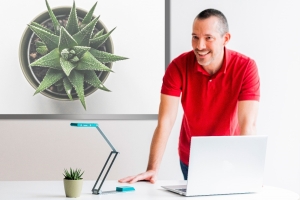
This 2-in-1 device combines a visualiser and a scanner, powered simply via USB. It features a 13-megapixel camera with a Sony CMOS sensor, capable of streaming 4K images at 30 frames per second and equipped with 10x digital zoom. These technical specifications allow users to focus on the smallest details, whether showcasing a book or an object up to A3 size.
The IRIScan Visualizer has been designed with mobility and practicality in mind. Its mechanical arm folds away easily, making it simple to store in a bag and transport. Its compact design and Plug & Play connectivity via USB Type-C make it compatible with a wide range of conferencing software and operating systems such as Windows and macOS.
Beyond its hardware capabilities, it’s the Readiris Visual software that makes it a true “Swiss Army knife”. This powerful programme comes bundled with the device and offers a clean interface, with all functions neatly arranged around the window edges for intuitive use. It includes numerous useful features to enhance the effectiveness of lessons and presentations.
The Readiris Visual software allows users to manage not only the IRIScan camera but also other cameras, offering valuable flexibility. It provides three main display modes: Visualiser mode for live camera view, Split Screen mode for comparing images or connecting two cameras, and an interactive whiteboard mode for live annotations.
In all display modes, drawing and text tools are available to annotate the live-projected image. Advanced features include image overlay to show both the presenter and the document simultaneously (if a second camera is connected), a masking function to hide parts of the image, and a spotlight tool to focus attention on a specific element.
Ease of Use
The software also enables live screenshots, video recording, and even stop-motion animation creation. For documents, it includes an automatic scanning and cropping function, with multilingual Optical Character Recognition (OCR) technology capable of extracting text from scanned documents.
The device features touch-sensitive buttons directly on the camera head. One button allows manual image rotation by 180° and autofocus, while another activates the LED lamp. These physical controls complement the simplified software control panel for a smooth user experience. The camera is equipped with a built-in G-sensor for automatic video rotation, preventing upside-down images, and includes autofocus. A side button on the camera head also activates AI-powered noise reduction technology.